Modern Large Language Models (LLMs) act as sophisticated reasoning engines, but they fundamentally lack agency. They can generate text, but they cannot execute actions. Transforming an LLM into a functional product requires bridging the gap between stochastic text generation and deterministic system execution.
An agentic browser extension is, by definition, a distributed system. It must orchestrate reliable, observable, and interruptible execution within the confines of third-party websites while strictly adhering to user permissions and security boundaries.
This article provides a macro-level architectural analysis of such a system, decomposed into three primary distinct components: the on-device Extension (runtime), the cloud-based Backend (orchestration), and the Web Console (control plane).
Background and Motivation
The browser is the operating system for modern work. It hosts authenticated sessions, rich user interfaces, and domain-specific workflows. However, for an automated agent, the browser represents a hostile execution environment characterized by dynamic DOM structures, rate limits, and ephemeral states. This inherent tension necessitates a strict architectural decoupling:
- The Browser Extension acts as the edge runtime. It is the specific component capable of interacting with web pages in the same context as the user, bypassing the need for brittle server-side rendering or headless browsers.
- The Backend acts as the centralized brain. It provides the durability required to run agent loops, enforce policies, and manage costs—tasks that are computationally and securely infeasible to perform entirely client-side.
- The Web Console acts as the administrative surface. It abstracts complexity away from the extension review process, allowing for rapid iteration on configuration, playbooks, and business logic.
Architecture at a Glance
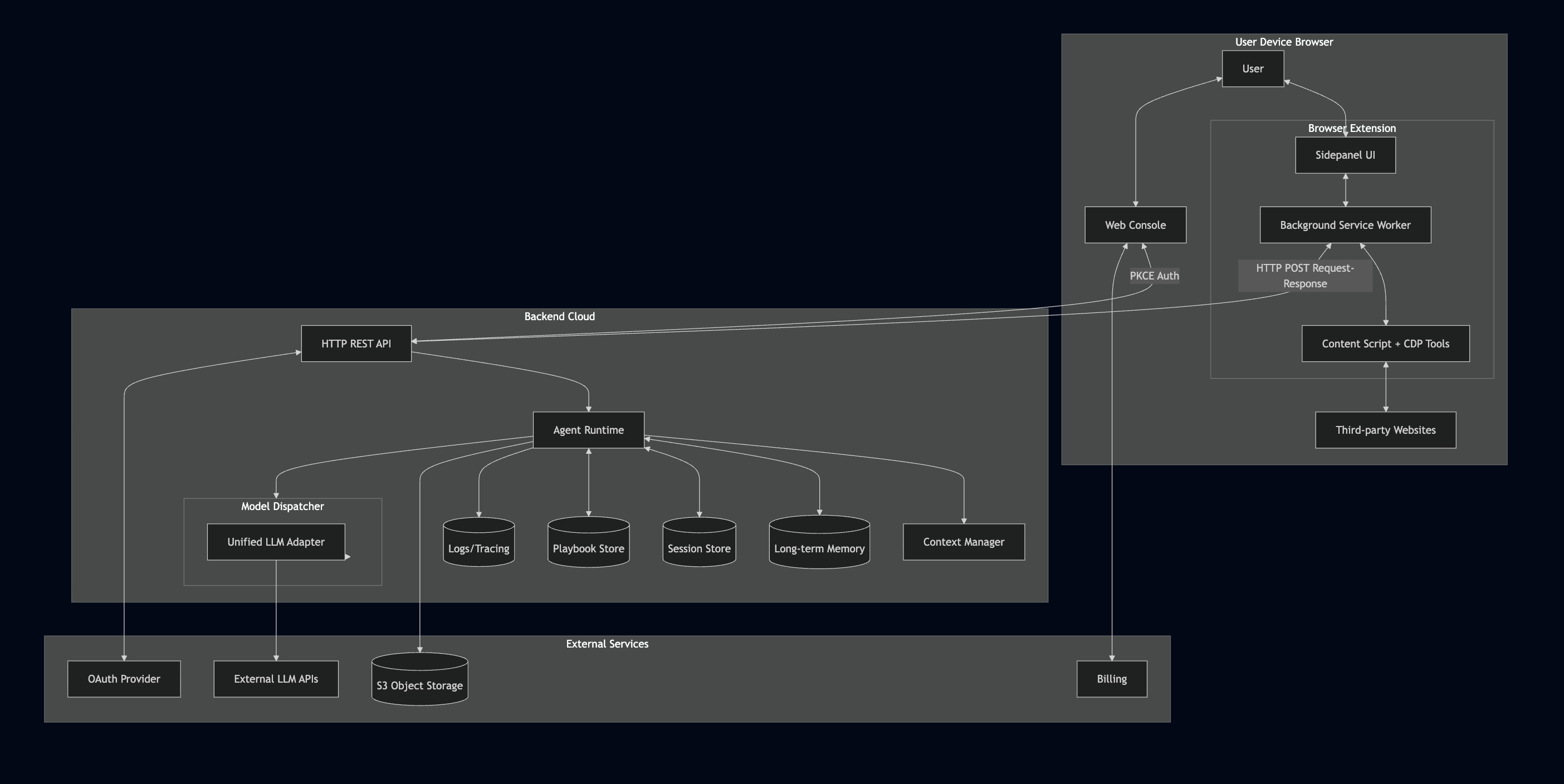
To manage system complexity, we can visualize the architecture as three interacting layers. Each layer abstracts a specific set of responsibilities to ensure scalability and maintainability.
- Execution Layer (Extension): Comprises the Chrome Debugger Protocol adapters, Accessibility Tree parser, and tool implementations that physically interact with the target webpage (click, type, scroll, read). This layer owns the browser context and user permissions.
- Orchestration Layer (Backend): Hosts the agent runtime loop, model routing (supporting multiple LLM providers), context management, and memory services. This is where probabilistic model outputs are transformed into deterministic control flow.
- Configuration Layer (API + Storage): Manages user authentication, session persistence, playbook definitions, and subscription entitlements. Split between backend APIs and extension local storage for optimal access patterns.
End-to-End Execution Flows
To understand how these components interact, we examine two critical workflows: identity management and the agent execution loop.
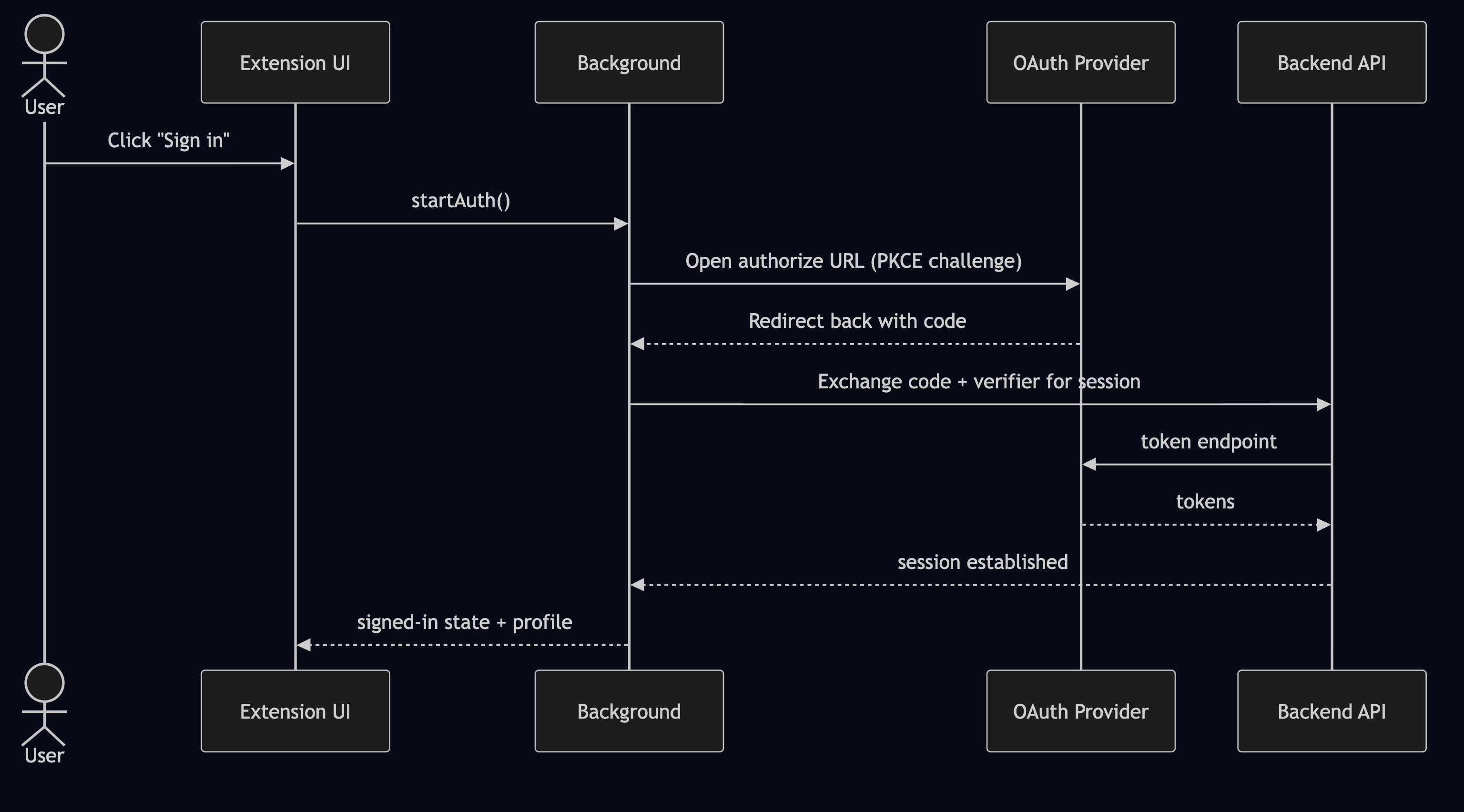
Flow 1: Unified Identity and Authorization
The extension functions as a privileged interface for the user’s account. Therefore, authentication must be treated as a strict system boundary. We utilize a PKCE (Proof Key for Code Exchange) flow to unify the identity across the web console and the extension without compromising security.
Flow 2: The Agent Execution Loop
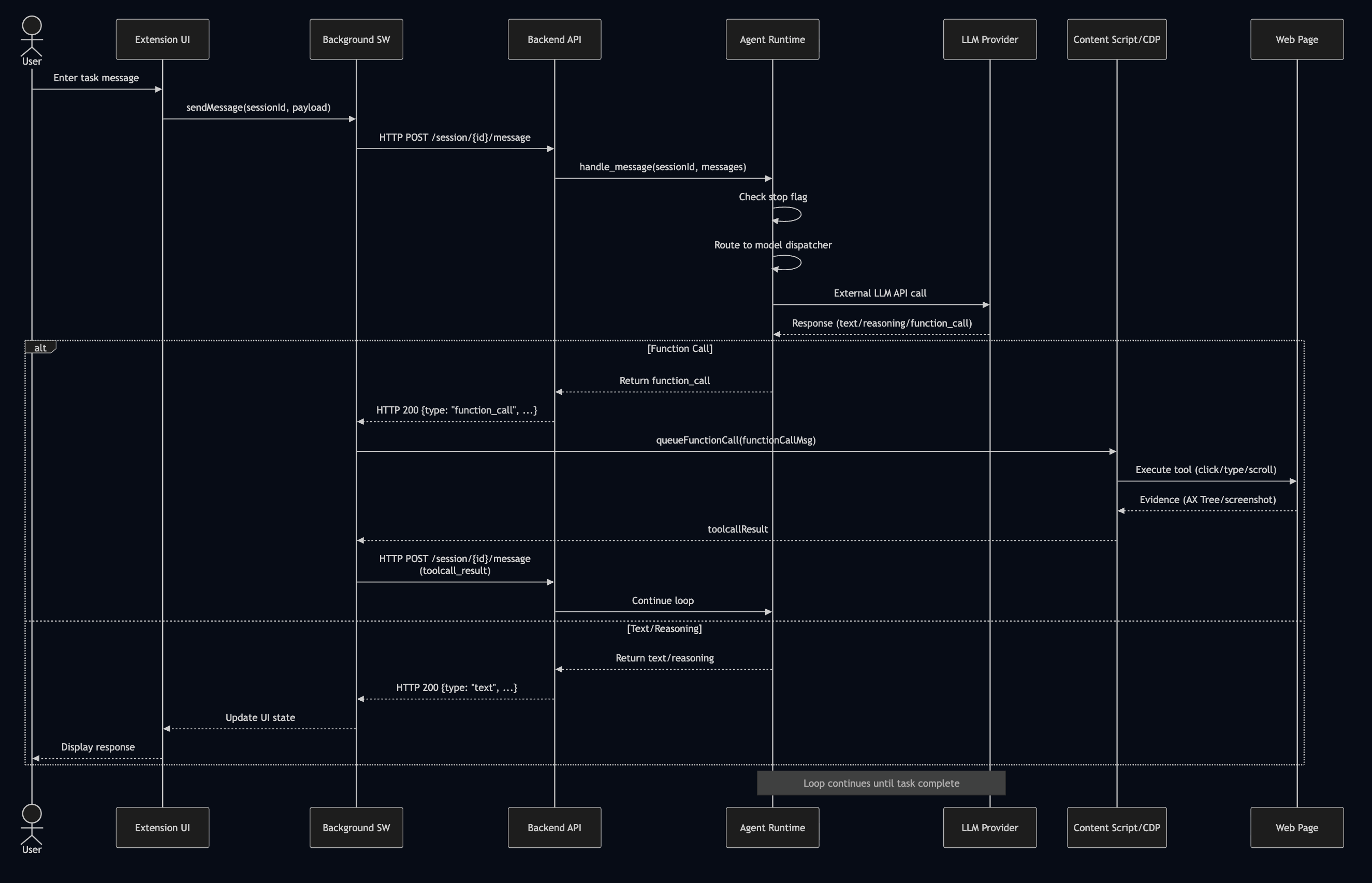
An agent run differs significantly from a standard API request. It is a persistent, stateful loop of reasoning and action. The system employs a request-response polling pattern: the extension sends user messages or tool results via HTTP POST, and the backend returns the next agent response (which may include tool calls). This client-driven loop continues until the task is complete, with the frontend maintaining UI state between requests to provide a seamless experience.
Component Deep Dive
1. The Extension: Trusted Execution Environment
The extension operates as the “hands” of the system. Architecturally, it is designed with three isolated layers to ensure security and performance:
- UI Layer (Sidepanel): Captures user intent and renders the agent state. It allows for immediate “human-in-the-loop” interruption via stop signals.
- Background Layer (Service Worker): Handles API communication, session state, and alarm-based token refresh. It routes messages between the sidepanel and backend while managing authentication lifecycle.
- Execution Layer (Content Scripts + CDP): Responsible for parsing the Accessibility Tree via Chrome Debugger Protocol, executing DOM interactions (click, type, scroll), and capturing structured evidence including screenshots. Crucially, the extension owns the Permission Boundary. It must explicitly decide when and where to act (e.g., restricted to the active tab) and is responsible for capturing structured execution evidence rather than simple boolean success flags.
Tool Execution via Chrome Debugger Protocol
The most technically demanding aspect of the extension is DOM interaction. Rather than relying on brittle CSS selectors, we use the Chrome Debugger Protocol (CDP) for precise, low-level control:
// Attach debugger to target tab
await chrome.debugger.attach({ tabId }, '1.3');

// Navigate and wait for load event
await send('Page.enable', {});
await send('Page.navigate', { url });
await waitForLoad();  // Listen for Page.loadEventFired

// Click at computed viewport coordinates
const { vx, vy } = await computeViewportPositionAndScroll(tabId, centerX, centerY);
await send('Input.dispatchMouseEvent', { type: 'mousePressed', x: vx, y: vy, button: 'left' });
await send('Input.dispatchMouseEvent', { type: 'mouseReleased', x: vx, y: vy, button: 'left' });

// Always detach to release resources
await chrome.debugger.detach({ tabId });
For iframe interactions, additional complexity arises: we must calculate frame offsets using DOM.getFrameOwner and DOM.getBoxModel to convert page-absolute coordinates to iframe-local coordinates.
Element Targeting Strategy
A critical design decision is how the agent identifies elements. Traditional approaches use CSS selectors or XPath, but these are brittle in dynamic web applications. Instead, we adopt a bounding-box coordinate system derived from the Accessibility Tree:
// Elements are identified by their visual bounding box, not selectors
const targetElement = {
  box: { x: 150, y: 320, width: 120, height: 40 },
  role: "button",
  text: "Submit",
  nodeId: 12345,
  frameId: null  // or frameId for iframe elements
};

// Click requires viewport coordinate conversion + auto-scroll
const { vx, vy, scrolled } = await computeViewportPositionAndScroll(tabId, centerX, centerY);

if (scrolled) {
  await delay(200);  // Wait for scroll animation to complete
}
This approach solves several problems: it works across frameworks (React, Vue, vanilla JS), handles Shadow DOM transparently, and remains stable even when class names or DOM structure change.
Input Handling
Text input is deceptively complex. The system must handle various input types (text fields, contenteditable divs, rich text editors) while respecting existing content and autocomplete behavior:
// Step 1: Focus and clear existing content
await send('Input.dispatchMouseEvent', { type: 'mousePressed', x, y, clickCount: 3 }); // Triple-click to select all
await send('Input.dispatchKeyEvent', { type: 'keyDown', key: 'Backspace' });

// Step 2: Type character by character for natural input
for (const char of content) {
  await send('Input.dispatchKeyEvent', { type: 'keyDown', text: char });
  await delay(10);  // Small delay for realistic typing
}

// Step 3: Optionally wait for autocomplete suggestions
if (waitForSuggestion) {
  await delay(500);
  // Agent can then choose to accept or dismiss suggestions
}
For contenteditable elements (like Gmail’s compose box), additional handling is required: we must use Input.insertText instead of individual key events to preserve formatting.
2. The Backend: Deterministic Orchestration
The backend transforms probabilistic model outputs into a reliable product. Its primary role is to enforce determinism of control flow while abstracting away the complexity of multiple LLM providers.
- Agent Runtime: Manages the planner loop, tool routing, and retry logic. Supports multiple LLM providers through a unified model dispatcher that handles provider-specific message formats and tool declarations.
- Context Management: Maintains goal extraction, context compression (triggered when tokens exceed thresholds), and long-term memory search for personalized interactions.
- Session State: Maintains context windows and summarizes history to manage token limits.
- Playbooks: Stores versioned, structured workflows that guide the agent’s decision-making.
flowchart TD
  START[User Message] --> FIRST{First Turn?}

  FIRST -->|Yes| EXTRACT[Extract Goal<br/>Parse <goal> tag]
  FIRST -->|No| LOAD[Load Context C_t]

  EXTRACT --> CREATE[Create Context C_0<br/>goal set, empty summaries]
  LOAD --> CHECK_BUDGET{Token Budget OK?}

  CREATE --> BUILD[Build System Instruction]
  CHECK_BUDGET -->|No| ENFORCE[Enforce Budget<br/>Remove oldest summaries]
  CHECK_BUDGET -->|Yes| BUILD
  ENFORCE --> BUILD

  BUILD --> FOLD_CHECK{Should Fold?<br/>>50% tokens or >20 summaries}
  FOLD_CHECK -->|Yes| FOLD_INST[Add Fold Instruction]
  FOLD_CHECK -->|No| CALL_MODEL[Call LLM]
  FOLD_INST --> CALL_MODEL

  CALL_MODEL --> PARSE[Parse Model Response]
  PARSE --> EXTRACT_CTX[Extract <context> tag]

  EXTRACT_CTX --> HAS_FOLD{Fold present?}
  HAS_FOLD -->|Yes| APPLY_FOLD[Apply Fold<br/>Merge micro → macro]
  HAS_FOLD -->|No| UPDATE_LATEST[Update Latest Interaction]

  APPLY_FOLD --> AUTO_MICRO[Auto-compress previous<br/>latest → micro summary]
  AUTO_MICRO --> UPDATE_LATEST

  UPDATE_LATEST --> HAS_TOOL{Function Calls?}
  HAS_TOOL -->|Yes| WAIT_TOOL[Wait for tool results]
  HAS_TOOL -->|No| SAVE["Save Context C_{t+1}"]

  WAIT_TOOL --> UPDATE_OBS[Update observation<br/>with tool evidence]
  UPDATE_OBS --> SAVE

  SAVE --> RETURN[Return to User]
Model Dispatcher and Provider Abstraction
Different LLM providers have incompatible APIs for tool calling, message formats, and special features. The backend abstracts this through a unified dispatcher:
def _call_model(self, messages, extra_instruction: str | None = None):
    """Unified model dispatcher - routes to provider-specific implementations."""
    if self.model.startswith("gpt"):
        return self.run_openai_agent(messages, extra_instructions=extra_instruction)
    elif self.model.startswith("gemini"):
        return self.run_gemini_agent(messages, extra_instruction=extra_instruction)
    else:
        raise Exception(f"Unknown model type: {self.model}")
Each provider requires different tool declaration formats:
# Gemini: Uses types.Tool with function_declarations
tools = types.Tool(
    function_declarations=get_gemini_tools(),
    code_execution=types.ToolCodeExecution(),  # Gemini-specific
    google_search=types.GoogleSearch()          # Gemini-specific
)
config = types.GenerateContentConfig(
    tools=[tools],
    thinking_config=types.ThinkingConfig(thinking_budget=-1, include_thoughts=True)
)

# OpenAI: Uses JSON schema format
tools = get_openai_tools()  # Returns list of function schemas
response = client.responses.create(
    model=self.model,
    tools=tools,
    reasoning=Reasoning(effort='low', summary='auto')
)
Goal Extraction
On the first turn, the system must determine whether the user’s message contains a concrete task or is merely conversational. This is achieved through structured output parsing:
def _extract_goal_from_response(self, resp_to_client: list) -> tuple[str | None, bool | None]:
    """Look for <goal> tag or <non-task> tag in agent's response."""
    for item in resp_to_client:
        if item.get('type') == 'text' and item.get('content'):
            content = item['content']

            # Check for non-task indicator first
            if re.search(r'<non-task></non-task>', content):
                return None, False  # This is just a greeting/chat

            # Check for goal tag
            goal_match = re.search(r'<goal>(.+?)</goal>', content, re.DOTALL)
            if goal_match:
                return goal_match.group(1).strip(), True  # Found a concrete task

    return None, None  # Unable to determine
The extracted goal becomes the anchor for all subsequent context management, persisting across the entire session.
Long-term Memory
For personalized interactions, the backend maintains a long-term memory service that persists across sessions:
# Backend function available to the agent
if func_name == 'search_user_memory':
    query = func_params.get('query', '')
    if self.memory and query:
        # Search across all previous sessions for this user
        results = self.memory.search_long_term_records(query=query)
        return {'type': 'function_call_output', 'output': json.dumps(results)}
    return {'type': 'function_call_output', 'output': json.dumps([])}
This allows the agent to recall user preferences, previous interactions, and learned patterns—transforming it from a stateless assistant into a persistent collaborator.
On the frontend, tool execution follows a queued pattern to prevent race conditions:
// Frontend tool execution queue
const queueFunctionCall = (functionCallMsg) => {
  if (isStoppedRef.current) return;

  processingQueue = processingQueue
    .then(() => handleFunctionCall(functionCallMsg))
    .catch(err => console.error('Function call failed:', err));
};

// After execution, send result back via HTTP POST
const toolcallResult = {
  type: 'toolcall_result',
  body: { toolcall_id, func_name, content: result }
};
await sendToolcallResult(toolcallResult);  // Triggers next backend turn
3. The Web Console: Operational Governance
While the extension handles execution, the Web Console manages governance. It serves as the hub for Onboarding (OAuth-based device linking via PKCE), Playbook management (creating, editing, and sharing workflows), and Commercial logic (subscriptions and usage quotas).
Note that many runtime configurations—such as model selection and session preferences—are actually managed within the extension’s settings page for immediate user access. The Web Console focuses on cross-device concerns and administrative functions that benefit from a full web interface. This separation allows business logic to evolve independently of the extension’s release cycle.
Cross-Cutting Design Principles
Reliability in distributed agentic systems is not accidental; it is the result of architectural discipline. To bridge the gap between stochastic models and deterministic browsers, we adhere to seven core principles.
1. The Principle of Least Privilege
Since the extension acts as a proxy for the user’s authenticated session, it effectively operates with “hands on the keyboard.” To mitigate security risks, we strictly scope host permissions to the active tab and gate sensitive actions behind explicit “human-in-the-loop” confirmation. The agent should never possess more authority than is immediately necessary for the current task.
2. Contract-First Messaging
Distributed systems degrade quickly when communication relies on ad-hoc message strings. To ensure stability, we enforce Contract-First Messaging. This manifests in two key areas:
Function Name Mapping: Backend uses Python-style snake_case, frontend uses JavaScript camelCase. A strict mapping table ensures compatibility:
// Frontend function mapping
const functionMapping = {
  'visit_website': 'visitWebsite',
  'click_box': 'clickBox',
  'get_page_accessibility_nodes': 'getPageAccessibilityNodes',
  'type_text': 'typeText',
  'scroll_page': 'scrollPage'
};
Parameter Name Conversion: Beyond function names, parameters also require conversion. The frontend automatically transforms all snake_case parameters to camelCase before execution:
// Convert parameter names from snake_case to camelCase
const convertedParams = {};
if (func_params) {
  Object.keys(func_params).forEach(key => {
    const camelKey = toCamelCase(key);  // wait_for_suggestion → waitForSuggestion
    convertedParams[camelKey] = func_params[key];
  });
}

// Execute with converted parameters
const result = await frontendFunction(convertedParams);
This bidirectional contract ensures that backend developers can use idiomatic Python naming while frontend code follows JavaScript conventions.
Message Schema: All messages follow a typed structure to prevent schema drift:
// Agent response types
type AgentMessage = {
  type: "text" | "reasoning" | "function_call"
  content?: string
  status: "completed" | "stopped"
  toolcall_id?: string
  func_name?: string
  func_params?: Record<string, unknown>
}

// Tool result format
type ToolcallResult = {
  type: "toolcall_result"
  body: {
    toolcall_id: string
    func_name: string
    content: Record<string, unknown> | { error: string }
  }
}
3. Progressive State Disclosure
In an agentic context, latency is inevitable. To build and maintain user trust, the system must never appear static. We prioritize Progressive State Disclosure through frontend-managed status states:
const AGENT_STATUS = {
  THINKING: 'thinking',      // Waiting for backend response
  TAKING_ACTION: 'action',   // Executing a tool locally
  IDLE: 'idle'               // Ready for next input
};
The frontend tracks the current function being executed and displays it to the user. When a tool call arrives, the UI immediately shows “Clicking button…” or “Navigating to…” before execution completes. This provides visibility into the agent’s progress even in a request-response architecture.
4. Interruptibility and Idempotency
Real-world web environments are non-deterministic, and user intent often shifts mid-task. The architecture handles this chaos through Interruptibility and Idempotency.
Interruptibility is implemented via coordinated stop flags on both ends:
# Backend: Thread-safe stop flag per session
_stop_flags = {}
_stop_lock = threading.Lock()

def should_stop(session_id: str) -> bool:
    with _stop_lock:
        return _stop_flags.get(session_id, False)
// Frontend: Check before and after each tool execution
if (isStoppedRef.current) {
  clearFunctionCallingState(null);
  return;  // Don't send result, don't continue
}
Idempotency is achieved through tool design—preferring explicit “Ensure Checkbox is Checked” actions over relative “Toggle Checkbox” actions—allowing the agent to recover gracefully from network blips or DOM shifts.
5. Evidence-Based Execution
To mitigate the risk of model hallucination in a functional environment, the system enforces Evidence-Based Execution. The agent is not permitted to assume an action was successful based solely on its own output. Instead, tools must return concrete artifacts which serve as the ground truth for subsequent reasoning steps.
Accessibility Tree as Structured Evidence: The primary evidence source is the Accessibility Tree, which provides a semantic representation of the page:
// Tool returns structured evidence, not just success/failure
return {
  accessibility_nodes: [
    { button: "Submit", box: {x: 150, y: 320, width: 120, height: 40}, nodeId: 123 },
    { textbox: "Email", box: {x: 100, y: 200, width: 300, height: 32}, nodeId: 124 },
    // ... all visible interactive elements
  ],
  page_height: 2400,
  y_offset: 500,           // Current scroll position
  viewport_box: { x: 0, y: 500, width: 1920, height: 1080 },
  note: "Visible viewport ≈ 1920px × 1080px. Page vertical offset ≈ 500px."
};
This structured output tells the model exactly what elements are visible, where they are, and what the current scroll state is—enabling precise subsequent actions.
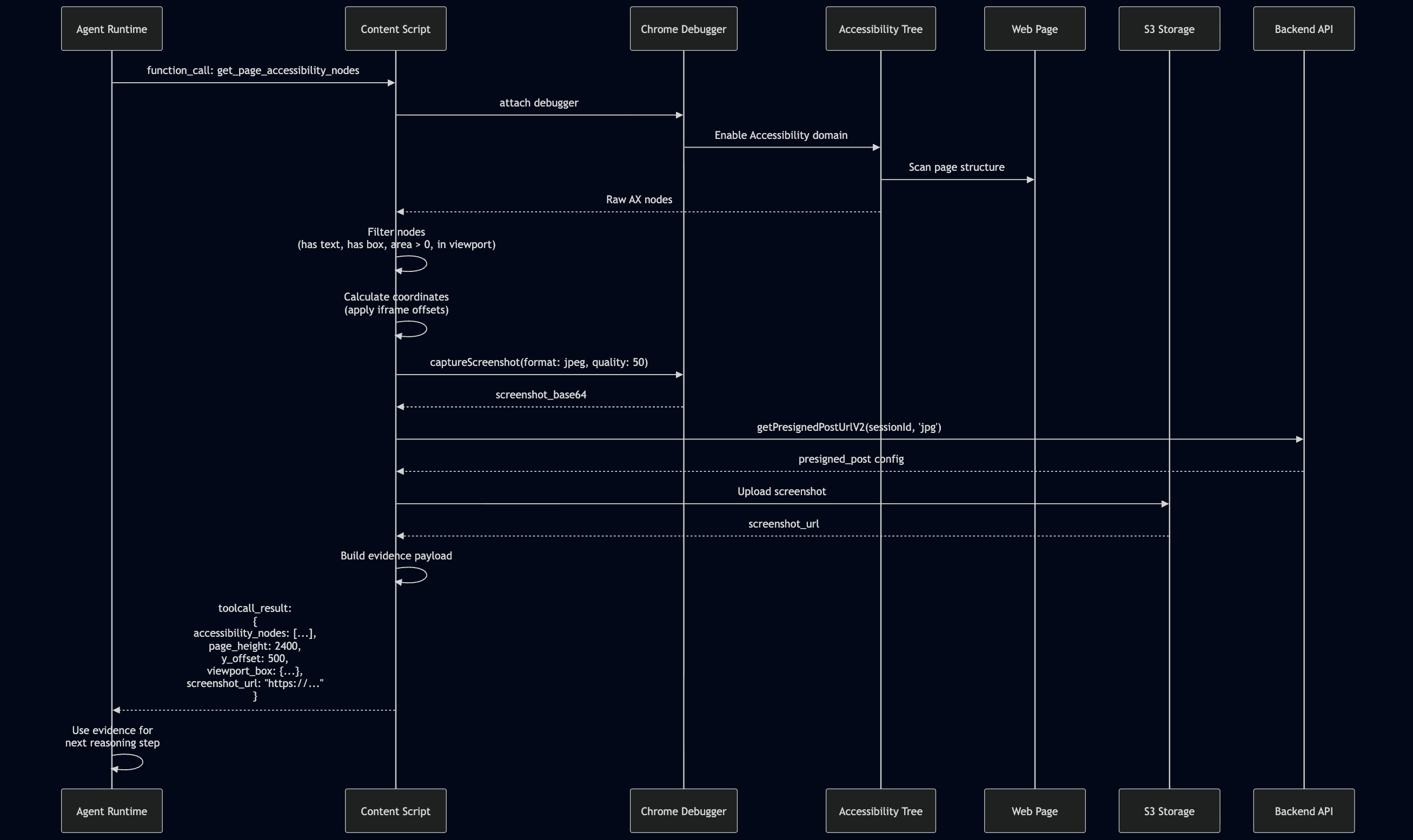
Visual Evidence via Screenshots: For complex UIs where AX Tree alone is insufficient, screenshots are captured and uploaded to S3:
// Capture screenshot, upload to S3, return URL (not base64)
if (result.screenshot_base64) {
  const uploadConfig = await getPresignedPostUrlV2(sessionId, 'jpg');
  const screenshotUrl = await uploadScreenshotToS3(result.screenshot_base64, uploadConfig);
  processedResult = { ...result, screenshot_url: screenshotUrl };
  delete processedResult.screenshot_base64;  // Avoid sending large payloads
}
This dual-evidence approach (structured AX Tree + visual screenshots) provides the model with both semantic understanding and visual verification.
6. Observability by Design
Debugging non-deterministic agents requires deep introspection. We achieve Observability by Design through several mechanisms:
Structured Logging: Every tool execution error is reported to the backend with full context:
sendFrontendLog({
  level: 'error',
  tool_name: func_name,
  msg: `Function call failed: ${error.message}`,
  extra: { toolcall_id, func_params, stack: error.stack }
});
Retry with Exponential Backoff: Transient failures are handled gracefully:
const shouldRetry = (status) =>
  status === 408 || status === 429 || (status >= 500 && status <= 599);

const delay = baseDelayMs * Math.pow(2, attempt - 1);  // 1s, 2s, 4s...
This allows us to trace a specific failure from the frontend UI state, through the backend orchestration logic, down to the specific DOM execution event in a single, coherent log.
7. Graceful Degradation
In a complex browser environment, not all APIs are available in all contexts. The system is designed to degrade gracefully when preferred methods fail:
CDP to Scripting Fallback: When Chrome Debugger Protocol is unavailable (e.g., on restricted pages), the system falls back to the Scripting API:
// Try CDP first, fall back to scripting API
let response;
try {
  if (chrome?.debugger) {
    response = await navigateWithDebugger(tab.id);
  } else {
    response = await navigateWithScripting(tab.id);
  }
} catch (_) {
  // CDP failed, use fallback path
  response = await navigateWithScripting(tab.id);
}
Multi-Strategy AX Tree Scanning: The Accessibility Tree scanner employs multiple strategies to maximize coverage:
// Primary scan
const result = await send('Accessibility.getFullAXTree', { includeIframeNodes: false });

// Fallback sweeps for iframes (run multiple times to catch lazy-loaded content)
await sweepIframesViaDOM();
await sweepIframesViaRuntime();     // Shadow DOM aware
await delay(250);                    // Wait for lazy iframes
await sweepIframesViaDOM();
await sweepIframesViaRuntime();
await sweepFramesViaFrameTree();    // Frame tree traversal
await sweepViaTargets();            // OOPIF (Out-of-Process iframes)
This defense-in-depth approach ensures that the agent can function even when individual browser APIs behave unexpectedly or are temporarily unavailable.
Conclusion
Building an agentic browser extension is an exercise in system design, not just prompt engineering. By architecting a clean separation between the execution runtime (Extension), the orchestration brain (Backend), and the management layer (Console), we can create systems that are robust, secure, and capable of performing real-world work. The future of agents lies not just in smarter models, but in better architectures that can harness those models safely and effectively.